

รายละเอียดจากผู้ผลิต (English)
MasterCard Prepaid (Flexicard) 10 USD Gift Card
อื่นๆ
OTHER
บัตรเติมเงิน & Gift Card
คำเตือน: โปรดอ่านรายละเอียดก่อนสั่งซื้อ หากซื้อแล้วไม่สามารถยกเลิกหรือขอเงินคืนได้
สินค้านี้ไม่ใช่ประเภท TH โปรดตัดสินใจก่อนสั่งซื้อ หากใช้งานในไทยไม่ได้ จะไม่สามารถยกเลิกหรือขอเงินคืนได้
สินค้าประเภทของขวัญ/บัตร/โค้ดทดลอง บางรายการมีกำหนดเวลากดใช้โค้ดหลังได้รับ (เช่น ภายใน 24-48 ชม.) แนะนำให้กดใช้ทันทีที่ได้รับคีย์ และอ่านเงื่อนไขในรายละเอียดสินค้าให้ครบ
วิธีเปิดใช้งานคีย์ (Activation)
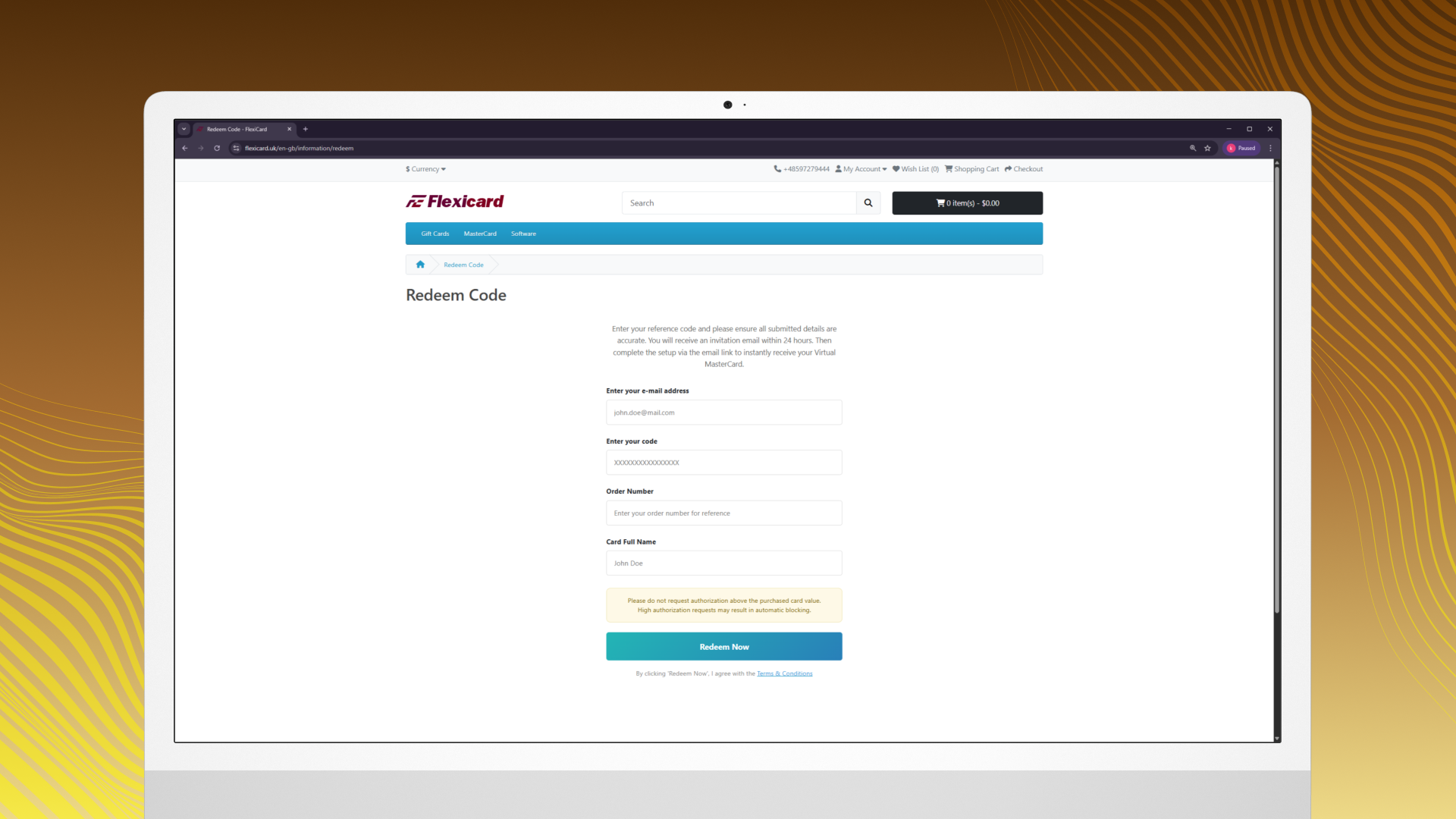
How to Activate Your Virtual MasterCard Purchase an M82 Consulting Virtual MasterCard voucher. Go to the redemption page: https://flexicard.uk/en-gb/information/redeem Enter your Email address. Enter the 16-digit voucher code and order number you received after purchase. Enter your full name, exactly as you want it to appear on the card. Click button "Redeem Now". You will see a "Request Submitted" confirmation message. Within 24 hours, you will receive an email invitation from Revolut Business to activate your virtual card. Check your inbox. If you don’t see the email, please check your Spam or Junk folder. Click the activation link in the email, complete the setup and KYC verification then instantly receive your Virtual MasterCard details. Once activated, use the card number, CVV and expiration date to make payments on any website that accepts MasterCard.
ข้อมูลสินค้า
| แพลตฟอร์ม | Other |
| โซนใช้งาน | OTHER (โปรดตัดสินใจก่อนสั่งซื้อ ยกเลิกไม่ได้) |
| ผู้พัฒนา | Flexicard |
| ผู้จัดจำหน่าย | Flexicard |
| ภาษาที่รองรับ | English, German, Polish, Dutch, Arabic, Danish, French, Italian, Russian, Turkish และอื่นๆ |
| การจัดส่ง | รับคีย์อัตโนมัติบนเว็บทันทีหลังชำระเงิน (ปกติไม่เกิน 1-2 นาที) |
สินค้าใกล้เคียง
ดูทั้งหมด
Boosteroid Cloud Gaming ULTRA PRO - 1 Week Subscription Key
฿519 เหลือ 999+
Boosteroid Cloud Gaming ULTRA PRO - 1 Month Subscription Key
฿849 เหลือ 999+
Boosteroid Cloud Gaming ULTRA - 1 Week Subscription Key
฿474 เหลือ 999+
Boosteroid Cloud Gaming ULTRA - 1 Month Subscription Key
฿786 เหลือ 999+

XBOX Live 50 TRY Prepaid Card TR
฿141 เหลือ 999+
ExitLag Annual Subscription Plan
฿2,160 เหลือ 999+
ศูนย์บริการที่คุ้มค่า TC-TERMGAME
ความปลอดภัย
รับประกันความปลอดภัย 100%
บริการรวดเร็ว
รับสินค้าทันทีหลังจากการซื้อ
คุ้มค่าราคาถูก
ราคาถูกและพร้อมโปรโมชั่นราคาประหยัด
บริการตลอดเวลา
เปิดให้บริการตลอด 24 ชั่วโมง